

A website enquiry arrives while your sales team is on a call. An invoice lands in a shared inbox. On Monday morning, someone opens last week’s spreadsheet and starts assembling the same report again. Each task starts with a predictable event, which makes it a good candidate for an n8n workflow.
This guide walks through five n8n workflows you can adapt for sales, customer support, finance and operations. Each example shows the nodes to connect, where AI fits, and what a successful run should produce. If you’re new to n8n, start with Gmail reply drafts. You can see the result in your inbox and review it before sending.
| Workflow | Best for | What it produces | Setup level |
|---|---|---|---|
| Lead capture and qualification | Sales and marketing | A lead record and an alert for sales | Easy to medium |
| WhatsApp customer support | Customer support | An FAQ reply or a support ticket | Medium |
| Invoice and receipt processing | Finance and admin | A spreadsheet row ready for review | Easy to medium |
| Gmail triage and reply drafts | Teams with a shared inbox | An email label and a reply draft when needed | Easy to medium |
| Weekly performance reporting | Marketing, sales and operations | A KPI summary in Slack or email | Medium |
An n8n workflow is a sequence of connected steps that moves data between apps and acts on it. A trigger starts the run, such as a form submission or a scheduled time. Each node does a job, such as reading a row or applying a rule. Connections pass data between nodes and let you route different cases to different actions.
A lead form, for example, can start a workflow that reads the enquiry, saves a row in Google Sheets and alerts sales. An AI model helps interpret the free-text enquiry. A regular IF node applies the sales team’s criteria. That split also works for invoices and reports. Use AI to read or write language, and use explicit rules for checks, calculations and routing decisions you need to reproduce.
Pick a task you can verify quickly. Create a Gmail draft from one test message, capture a lead in a test sheet or send yourself one weekly report. Once that first run works, try a case where a field is missing or the model can’t find an answer. That’s often where you’ll learn what the team needs before using the workflow every day.
If you want guided practice building automations for business teams, explore INTTRVU.AI’s Generative AI and Agentic AI for Leaders program.
A training provider might receive enquiries about team workshops, individual courses and existing enrolments through the same form. Reading each message before assigning it slows down follow-up. This workflow gives sales a short summary and flags business enquiries that meet the team’s criteria
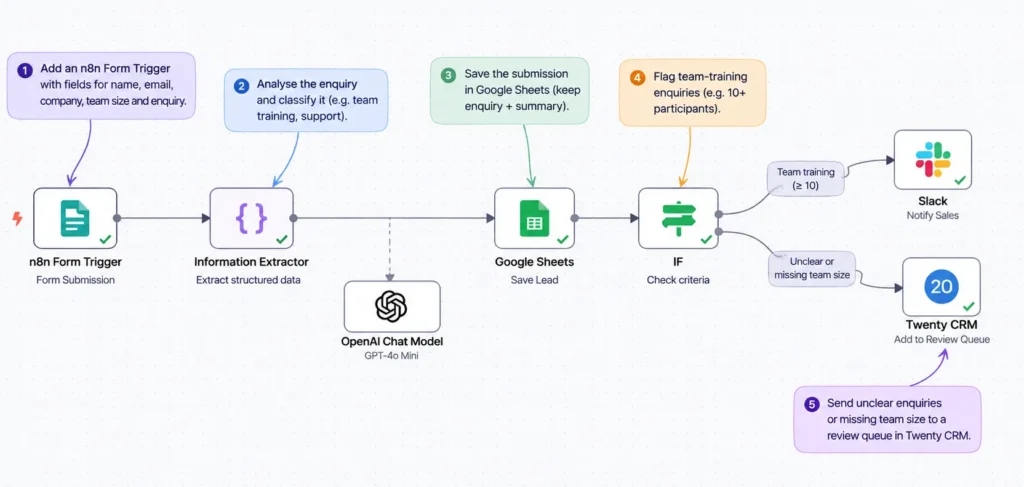
Example result: “We’d like an AI workshop for 18 managers next month” becomes a lead labelled team_training with 18 participants and a sales alert. Sales can open the original record and decide how to follow up.
Support teams often answer the same questions about hours, bookings or how to access a portal. A WhatsApp workflow can handle questions covered by an approved FAQ and send account-specific requests to someone who can investigate.
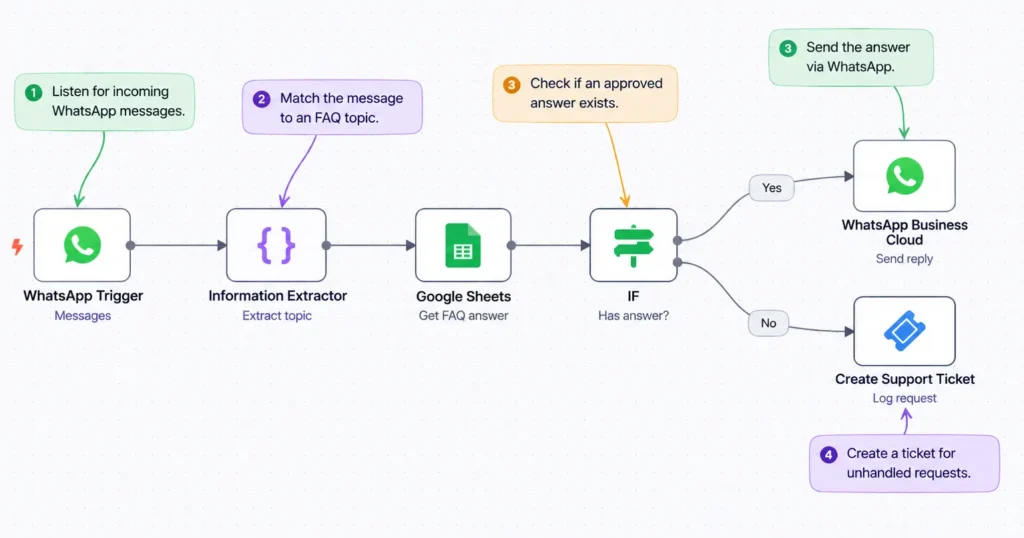
Example result: “How do I reset my portal password?” gets the approved reset steps. “I paid yesterday and my course still isn’t showing” becomes a support ticket for a teammate to check.
Supplier invoices arrive in different layouts. One puts the invoice number at the top and another buries it beside the payment details. AI can pull those fields into a consistent format so finance can focus on checking them against the original document.
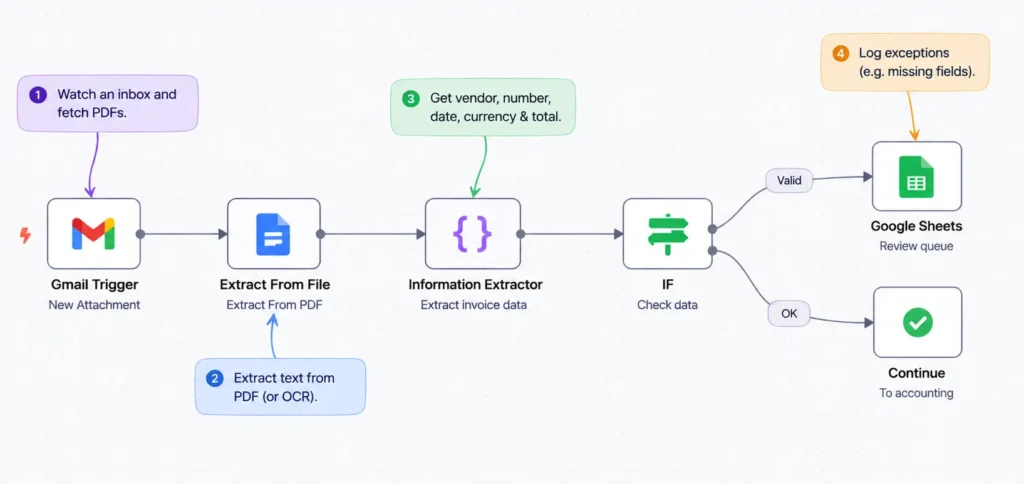
Example result: A sample PDF from Northstar Supplies produces a row with invoice ID NS-1042, date 2026-11-12, currency INR, total 11800.00 and status Pending review. A cropped scan with no visible total is flagged for manual entry.
A shared inbox can contain sales enquiries, customer questions and automated notifications. Sorting them takes time before anyone starts replying. This workflow labels each email and prepares a draft for messages that need a response.
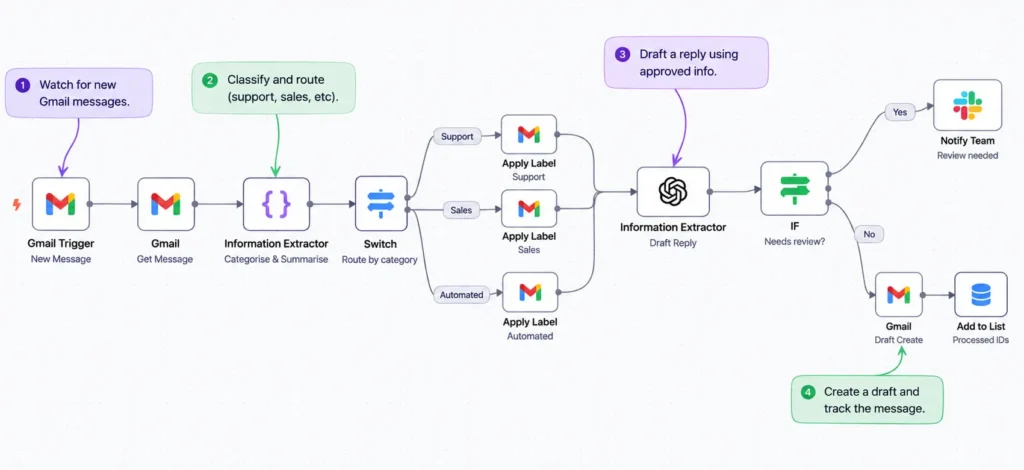
Example result: “Could you share the dates for the next workshop?” gets a sales label and a draft using the approved schedule. If the schedule is missing, a teammate gets the inquiry to handle directly.
A marketing team may already track spend and leads in a spreadsheet. The Monday task is to pull the two reporting periods, compare them and write a summary. n8n can gather the data and calculate the figures, then use AI to explain the changes in plain language.
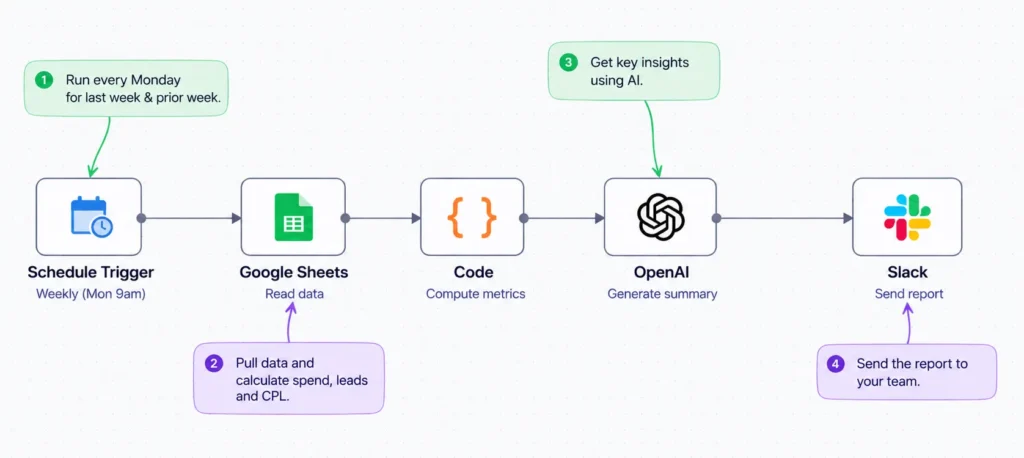
| Metric | Previous week | Last completed week |
|---|---|---|
| Ad spend | ₹10,000 | ₹10,000 |
| Leads | 100 | 125 |
| Cost per lead | ₹100 | ₹80 |
The report summary could read, “Spend held steady and leads rose by 25%. Cost per lead fell 20%, from ₹100 to ₹80.”
Take your n8n automation skills further with inttrvu.ai’s 6-month advanced certification program in Generative AI and Agentic AI. Learn RAG, LangChain, CrewAI, MCP, n8n, and more through hands-on projects, and earn a NASSCOM certification. Explore INTTRVU.AI’s Generative AI and Agentic AI Certification.
Yes. Start with a visual workflow using familiar apps, such as capturing a form submission in Sheets or drafting a Gmail reply. Expect to spend some time connecting accounts, selecting fields and testing what happens when data is missing. Adding OCR, webhooks or a CRM usually adds setup.
Yes. The AI Agent node can use connected tools such as an API lookup. That can help when the next step depends on what the user asks, for example when a support assistant must choose between looking up order status and searching an FAQ. A fixed workflow using a classifier and a lookup is enough for the FAQ example above. If an agent can take consequential actions, n8n supports human approval before selected tool calls.
A workflow is the automation you configure and run. A template is a reusable starting point. After importing one, connect your own accounts, check the node settings and test it with sample data.
No. A form can write directly to a spreadsheet, and a scheduler can send a report from figures calculated in Sheets. Add AI when you need to interpret a message, extract information from a document or turn data into a readable summary.